
“The customer paid by M-Pesa, but nobody can find the right bill.”
Keep the receipt details, confirmation status, balance, and bill connected.
For restaurants, bars, lounges, and nightclubs in Kenya
TabFlow keeps the order, kitchen or bar ticket, M-Pesa payment, recipe stock, and serving shift on one clear trail—so your team can focus on guests and you can explain every number.
A practical 30–45 minute demonstration shaped around your menu, service flow, payments, and closeout.

Does this happen at your venue?
A missing ticket, unmatched payment, or unexplained stock difference may look small during service. Together, they create a slower team, an unhappy customer, and another difficult close.
Keep the receipt details, confirmation status, balance, and bill connected.
Give preparation one visible queue with the latest items, notes, and timing.
Connect sent orders to recipe stock movements, corrections, and history.
Surface unfinished work, shortages, and approvals while they can still be explained.
Bring sales, collections, stock, staff activity, and exceptions into one live view.
One busy order, without the gaps
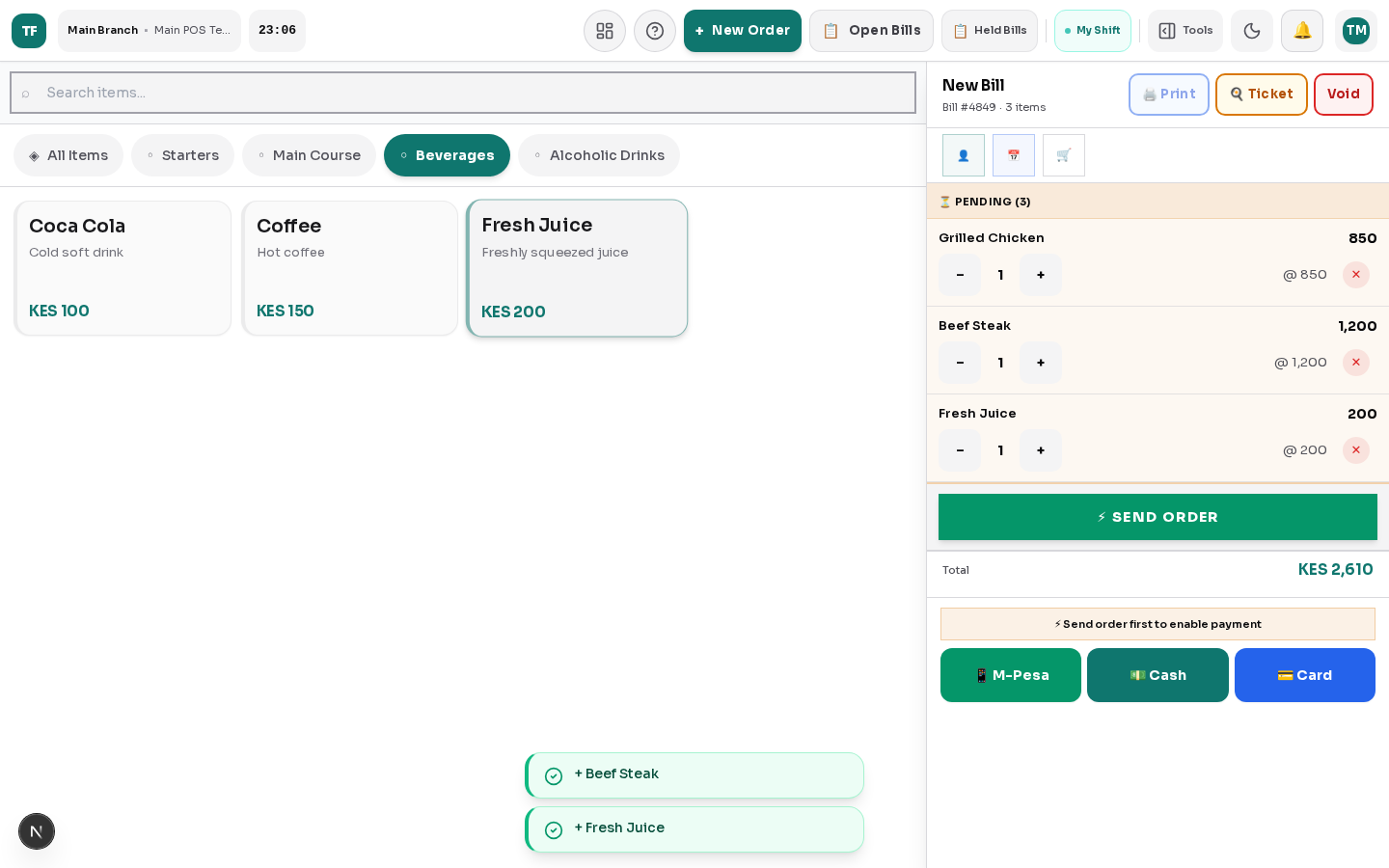
These are real TabFlow screens. Follow the order from the first change to preparation, stock, and payment.
The table changes the order. The kitchen hears a different version.
Items, modifiers, notes, quantities, and the live total stay together on the same bill until the team is ready to send it.

Bring your menu and the problem that causes the most frustration. We will run this workflow using examples your team recognises.
See my service flow in TabFlowFor owners and managers
Stop waiting for end-of-day screenshots and explanations. See how sales, payments, stock, open bills, and the team are moving while someone can still act.
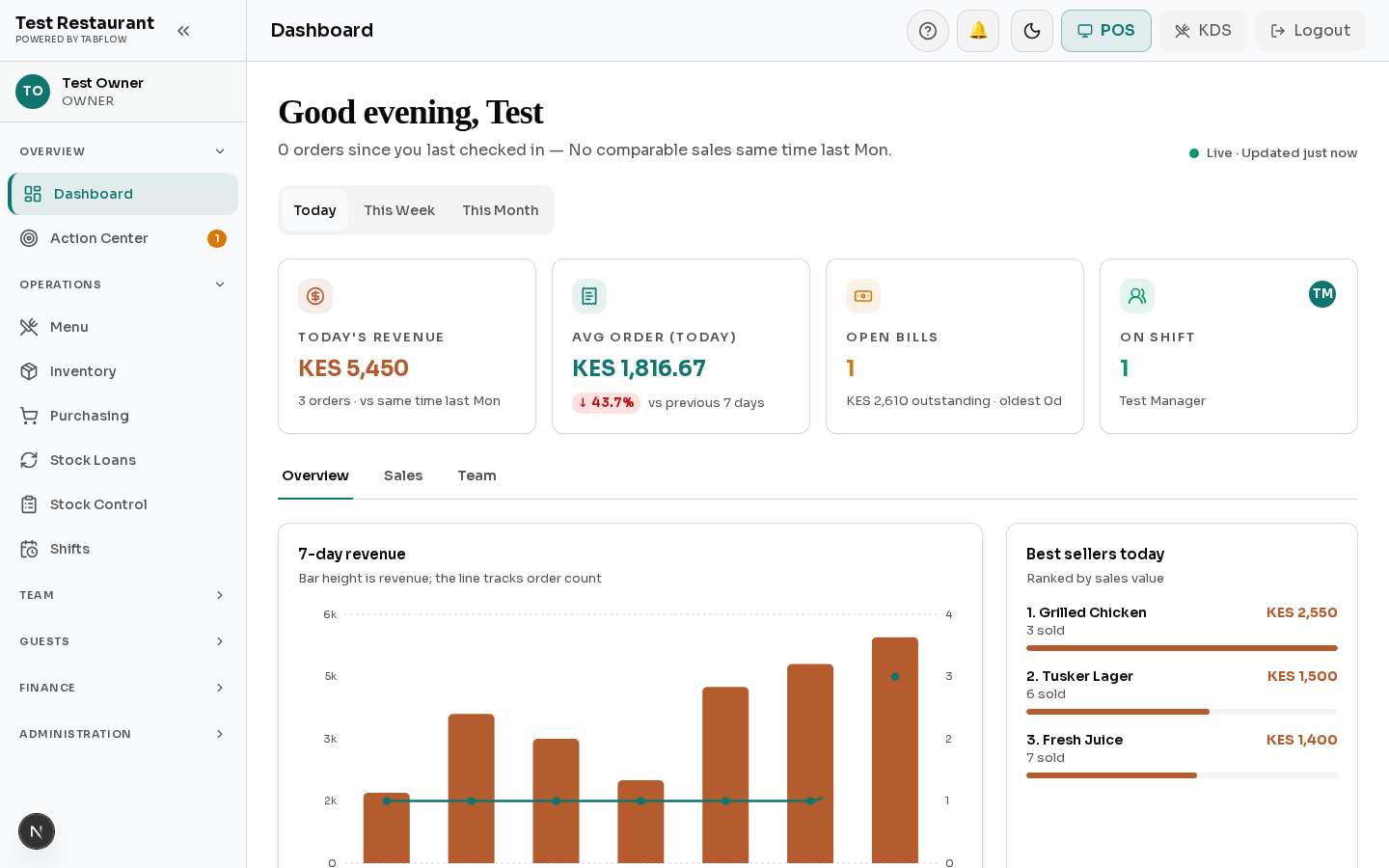

Separate sales from confirmed collections, credit, recoveries, and outstanding bills.
Bring low stock, stock reviews, shortages, void requests, and old open shifts into view.
Trace the location, shift, employee, payment, and manager action without chasing messages.
Built around how hospitality works
TabFlow starts with the operating problems your team already knows, then connects the people, money, stock, and decisions behind them.

Changed orders, missed preparation tickets, split bills, and a rush that leaves no time to repeat work.
Fast-moving tabs, bottle stock, shared tills, and end-of-night differences that are hard to explain.
Multiple service points, rapid payments, staff handovers, and a closeout that turns into an investigation.
Different service areas send separate reports, while management waits to see where attention is needed.
Made for everyday operations in Kenya
TabFlow is shaped around the payment methods, equipment, staff structures, and reporting expectations hospitality teams work with every day.
Support confirmation, receipt-code entry, reconciliation, and exception review without relying on a phone gallery.
Use practical receipt, preparation, and dispatch workflows with compatible ESC/POS equipment.
Connect staff access, stock custody, cash responsibility, approvals, and handovers.
Support Kenyan payroll inputs and structure sales records with KRA eTIMS readiness in mind.
Extend the operation when it makes sense
Mobile and multi-outlet capabilities support the sale; they do not replace the order, payment, stock, and management controls customers need today.

Optional paid add-on
Android phones and tablets are available today. An app for iPhone and iPad is planned next.
Ask about mobile accessPlanned expansion
Multi-outlet operations are planned to connect outlet-level teams, menus, cash, and stock with one management view.
Discuss my outlet plansQuestions before a demonstration
We will not hide the practical details. Bring your hardware, payment, connectivity, staffing, and rollout questions.
We configure the walkthrough around your menu, service style, devices, payment methods, and staff roles. Training then follows the same order-to-close routine your team already understands.
Yes. TabFlow supports M-Pesa collection and reconciliation workflows, including receipt-code matching and exception review. The exact experience depends on the Safaricom integration configured for your venue.
Tracked menu recipes and selected modifiers can create stock movements when an order is sent. Stock takes, purchases, transfers, corrections, voids, and movement history remain separate and reviewable.
Mobile access is an optional paid add-on. Compatible Android phones and tablets are supported today. An app for iPhone and iPad is planned and will be announced when it is ready.
Not yet. Multi-outlet operations are TabFlow’s next major capability. Existing single-outlet customers are expected to keep their current workflow while group and hotel controls are introduced.
TabFlow supports practical ESC/POS receipt, preparation, and dispatch workflows. We review your current devices, network, and printer models during onboarding before confirming compatibility.
A practical TabFlow demonstration
In 30–45 minutes, we will run a live order, preparation handoff, payment, stock movement, and manager review using a workflow your team understands.
Book my live workflow demoNo generic slide deck. We focus on the gap you want fixed.